
Turning off Find My on your Mac helps you prepare to sell or give your Mac away effectively.
Find My for Mac is a powerful and convenient feature developed by Apple that allows users to locate their Mac computers in case they are lost or stolen. It integrates seamlessly with the Find My app, available on iOS devices, making it easier than ever to track down a missing Mac.
By enabling Find My on a Mac, users can pinpoint its exact location on a map and receive real-time updates on its whereabouts. This feature not only provides peace of mind but also assists in the recovery process, allowing users to remotely lock their Macs, display custom messages on the screen, or erase all data to safeguard their personal information. Find My for Mac is a valuable tool that ensures the safety and security of one’s digital life.
| Requirements: |
|---|
| Mac |
| Internet Connection |
| iCloud |
| iCloud/Apple ID Password Reset your Password |

How do I Turn off Find My on My Mac?
- If prompted, enter your Apple ID and password to access the iCloud settings.
- In the iCloud preferences, locate and click on the “Find My Mac” option.
- A checkbox labeled “Find My Mac” will be displayed. Uncheck this box to disable Find My on your Mac.
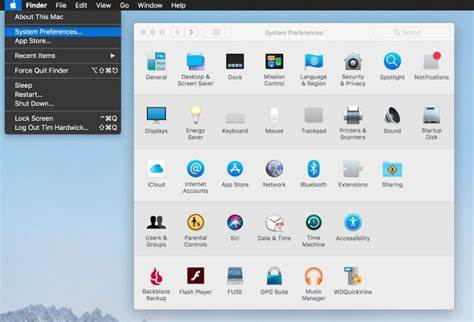
- If prompted, enter your Apple ID and password to access the iCloud settings.
- In the iCloud preferences, locate and click on the “Find My Mac” option.
- A checkbox labeled “Find My Mac” will be displayed. Uncheck this box to disable Find My on your Mac.
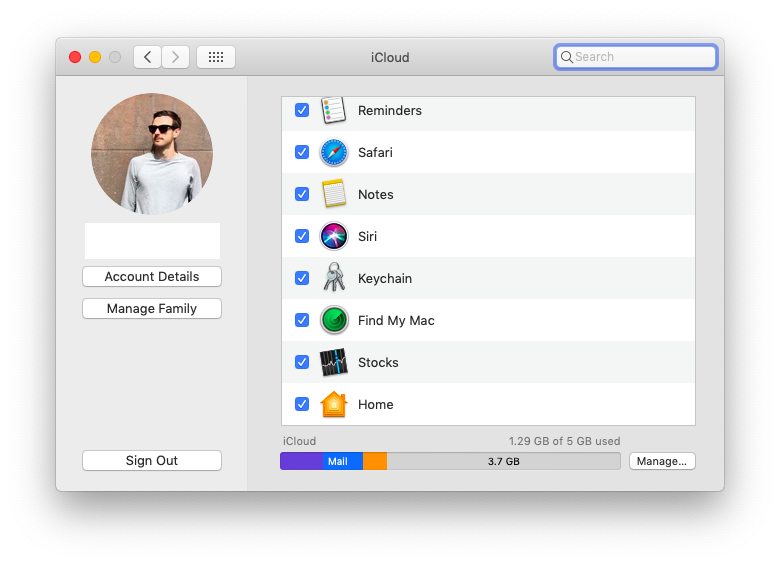
- If you want to turn off Find My completely for your Apple ID, you can also click on the “Options” button next to “Find My Mac” and uncheck the “Find My Mac” option in the subsequent window.
- Confirm your action when prompted.
- Close the System Preferences window.
Having Trouble? Denver Mac Repair is happy to help, stop on by today, no appointment necessary!
Why Would I Turn Off Find My Mac?
There are several reasons why someone may need to turn off Find My on a Mac. Find My is a useful feature introduced by Apple that allows users to locate their devices if they are lost or stolen. It utilizes the device’s built-in GPS or Wi-Fi to pinpoint its location on a map. However, there are certain scenarios where disabling Find My becomes necessary.
- Troubleshooting and repairs: When experiencing issues with a Mac, technicians may require Find My to be turned off to perform certain diagnostics or repairs. By disabling the feature, they can avoid potential conflicts and ensure a smooth troubleshooting process.
- Selling or giving away a Mac: If you are planning to sell or give away your Mac, it’s essential to disable Find My. This ensures that the new owner can set up the device without any hindrances and prevents your personal information from being accessible through the Find My feature.
- Privacy concerns: While Find My provides valuable security and peace of mind, some individuals may have privacy concerns. Disabling the feature can alleviate worries about their location being tracked, particularly if they feel uncomfortable with certain apps or services having access to their location data.
- Restoring from a backup: When restoring a Mac from a backup, disabling Find My may be necessary. This is especially relevant when setting up a new device or restoring a backup to resolve an issue. Turning off Find My ensures a seamless restoration process without any conflicts or errors.
- Reconfiguring iCloud settings: In some cases, users may need to modify their iCloud settings, which can require disabling Find My. For example, changing the primary iCloud account associated with the Mac may necessitate temporarily turning off Find My to allow the transition to occur smoothly.
- Battery optimization: Find My can consume a significant amount of battery life as it actively uses location services. If you are in a situation where preserving battery life is crucial, such as during extended periods without access to charging, disabling Find My can help conserve power.
It’s important to note that turning off Find My on a Mac requires the user to have the Apple ID and password associated with the device. This is a security measure to prevent unauthorized individuals from disabling the feature without proper authentication.
While Find My is an advantageous feature for many users, there are specific circumstances where disabling it becomes necessary or preferred. Whether for troubleshooting, privacy concerns, device transfers, or other specific situations, being able to turn off Find My on a Mac provides flexibility and control over the device’s functionality.
- Why should I look for a Mac refurbished by Apple Certified Mac Technicians?

- Why does Apple matter when buying a MagSafe 1 or 2 adapter?

- What is the iPhone Air?

- What does it mean when an external hard drive format is for Mac or for Windows?

- Designed by Apple in California. Loved in Colorado.

- How do I migrate my iTunes and App Store purchases to another Apple Account.

- Boulder Mac Repair is currently purchasing Apple Devices for resale.

- What’s new in iOS 26?
