
macOS 10.13 High Sierra is the highest supported version on several models of Macs.
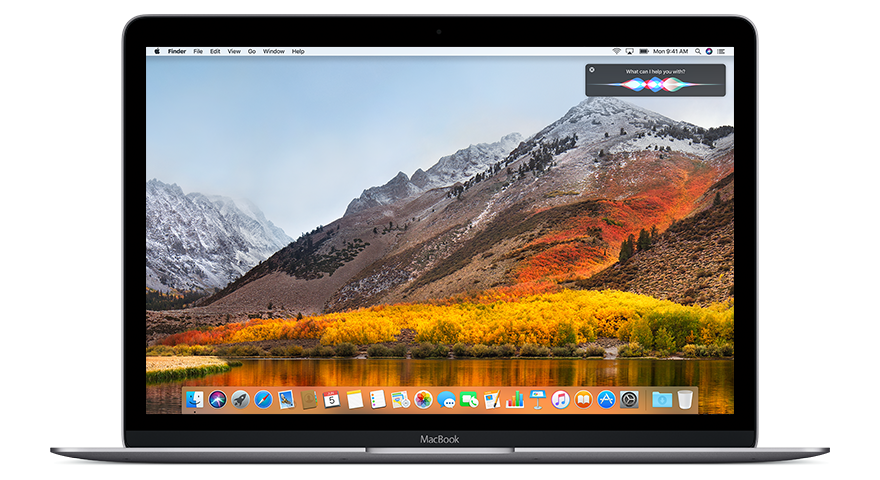
macOS 10.13 High Sierra, introduced on September 25, 2017, marked a critical evolution rather than a revolution in Apple’s desktop operating system. Instead of revamping the interface or visual experience, Apple prioritized under-the-hood innovations that would serve as a technological springboard for future macOS developments. The company positioned High Sierra as an update that embedded “a new file system, video format, and graphics engine at the core of the Mac,” underscoring its commitment to performance and future readiness. This approach made High Sierra a cornerstone release for both power users and developers looking ahead.
A standout advancement in this version was the debut of the Apple File System (APFS), which replaced the aging HFS+ format on Macs with SSDs. Tailored for modern flash storage, APFS introduced faster file access, enhanced data reliability, and built-in encryption features—all of which collectively elevated the overall speed and security of the platform. Another substantial improvement came with native support for HEVC (H.265), a cutting-edge video codec that offered superior compression and playback capabilities—just in time for the rise of 4K media.
High Sierra also unveiled Metal 2, the next iteration of Apple’s proprietary graphics framework. Designed to boost GPU performance, Metal 2 catered to the needs of creatives, developers, and anyone leveraging high-intensity applications, including machine learning workflows and external GPU setups. On the app side, High Sierra wasn’t without user-facing enhancements: the Photos app received a refreshed interface and more advanced editing functions, Safari added smart tracking protection for privacy-conscious browsing, and Notes introduced new organizational tools like tables and pinning.
Though it lacked dramatic visual changes, macOS High Sierra proved to be a foundational release, setting the stage for many of the major shifts in later versions. Its rock-solid reliability and forward-thinking infrastructure won favor with users who valued performance gains and long-term compatibility with emerging tech trends.
Importantly, High Sierra was the final macOS release compatible with several older Mac models, making it the go-to upgrade for users eager to keep legacy hardware running smoothly and securely before support eventually phased out in newer versions.
Still using macOS 10.13? You’ll find answers to all your questions just below.
TABLE OF CONTENTS
What Machines support macOS 10.13?
MacBook (Late 2009 or newer)
- MacBook (13-inch, Late 2009)
- MacBook (13-inch, Mid 2010)
MacBook Air (Late 2010 or newer)
- MacBook Air (11-inch and 13-inch, Late 2010 through 2017)
MacBook Pro (Mid 2010 or newer)
- MacBook Pro (13-inch, 15-inch, and 17-inch, Mid 2010 through 2017)
Mac mini (Mid 2010 or newer)
- Mac mini (Mid 2010 through 2014)
iMac (Late 2009 or newer)
- iMac (21.5-inch and 27-inch, Late 2009 through 2017)
Mac Pro (Mid 2010 or newer)
- Mac Pro (Mid 2010 and Mid 2012, with Metal-capable GPU recommended)
- Mac Pro (Late 2013)
Important Notes:
- APFS Conversion: Only Macs with SSDs were automatically converted to APFS during installation. Macs with traditional hard drives or Fusion Drives retained HFS+ by default, though APFS support could be manually enabled later.
- Metal Graphics Requirement: Some features, especially those introduced with Metal 2, required a Metal-compatible GPU. This was particularly relevant for Mac Pros from 2010–2012, which could be upgraded with a compatible GPU to fully support High Sierra’s graphics technologies.
What web browsers are supported under 10.13?

Chromium Legacy is a community-driven revival of the Chromium browser, tailored specifically for older macOS versions like 10.13 High Sierra, 10.12 Sierra, and even 10.11 El Capitan.
This unofficial build breathes new life into aging Macs by delivering modern web capabilities that would otherwise be out of reach.
🔧 Tailored for macOS 10.13 High Sierra
-
Runs flawlessly on macOS 10.13.
-
Actively updated as of 2025, with ongoing security patches and support for current web technologies.
-
Perfect for users seeking a Chromium-based browser without leaving High Sierra behind.
-
Maintains compatibility with a wide range of modern websites and Chrome Web Store extensions.
🟢 Why Choose Chromium Legacy on High Sierra?
-
More secure than using Chrome 109, which is now obsolete and unsupported.
-
Less bloated and more privacy-conscious by default, since it’s not directly tied to Google.
-
An excellent option for users who can’t or won’t upgrade their macOS, but still need a modern browser experience.
📥 Download Chromium Legacy
Grab the latest version from the project’s GitHub repository:
🔗 https://github.com/blueboxd/chromium-legacy
Head to the “Releases” section to find current builds.
🚫 Other Browser Options for macOS 10.13 (and Why They’re Risky in 2025)
-
Safari (v13.1.2 – Final Version for High Sierra)
-
Preinstalled and last officially supported in 2021.
-
Basic functionality remains, but lacks critical security updates and support for modern web technologies.
-
Not recommended for secure browsing in 2025.
-
-
Firefox ESR 115
-
The final Extended Support Release to work with macOS 10.13.
-
Official support ends September 2024, but it remains one of the safest and most capable choices for now.
-
Available via Mozilla’s ESR archives.
-
-
Google Chrome (up to v109)
-
Discontinued support for High Sierra in early 2023.
-
Version 109 was the final build—receives no security updates.
-
Not safe for day-to-day web use.
-
-
Brave (up to ~v1.47)
-
Also Chromium-based, Brave ceased High Sierra support shortly after Chrome.
-
Older builds might run, but no ongoing updates or patches are available.
-
-
Vivaldi (up to v5.6)
-
Early 2023 versions are compatible, but active development has left 10.13 behind.
-
Outdated in terms of both features and security.
-
-
Pale Moon (Unofficial macOS Builds)
-
Pale Moon doesn’t officially support macOS, but third-party ports exist (including Basilisk variants).
-
These are experimental and best suited for tech-savvy users comfortable troubleshooting.
-
What is the highest version of Microsoft office supported under 10.13?
✅ Microsoft Office 2019 for Mac
-
Compatible macOS Versions: macOS 10.12 Sierra through macOS 10.14 Mojave
-
Included Applications: Word, Excel, PowerPoint, Outlook, OneNote
-
High Sierra Support: Office 2019 received regular updates on macOS 10.13 until late 2021
-
Update Status: While Microsoft ceased updates for Office 2019 on High Sierra in October 2021, the suite remains fully operational if it’s already installed.
-
Bottom Line: For users sticking with macOS 10.13, Office 2019 is the last fully-featured version that runs smoothly and reliably.
⚠️ Microsoft Office 2021 & Microsoft 365 (Subscription-based)
-
Not Compatible with High Sierra
-
These newer versions require macOS 10.15 Catalina or later—macOS 10.13 is officially excluded.
-
Attempting to install on High Sierra will result in errors or failed installations.
🗂️ Alternative Productivity Tools for macOS 10.13
If you don’t have access to Office 2019—or only need basic editing—consider these modern, lightweight alternatives that still work well in 2025:
-
Office Online – Use free versions of Word, Excel, and PowerPoint in a browser (works great in Chromium Legacy or Firefox ESR).
-
LibreOffice – A powerful, open-source suite that continues to support many older macOS builds, including 10.13.
-
Google Docs, Sheets, and Slides – Accessible through your browser and offer real-time collaboration features.
What is the highest version of Adobe Creative Suite supported on macOS 10.13?
✅ Adobe Creative Cloud 2019
If you’re on macOS 10.13 High Sierra, Adobe CC 2019 is your last stop for full Creative Cloud compatibility. Released in late 2018, this suite marks the final wave of Adobe apps officially supported on High Sierra.
Included Titles from the CC 2019 Lineup:
-
Photoshop CC 2019
-
Illustrator CC 2019
-
Premiere Pro CC 2019
-
After Effects CC 2019
-
InDesign CC 2019
-
Audition CC 2019
-
…and the rest of Adobe’s 2019 family of tools
To install and run these apps, you’ll still need an active Creative Cloud subscription, along with access to archived installers (available to some enterprise users or through Adobe’s official support channels).
🚫 Incompatible Versions: What Won’t Work on High Sierra
-
Creative Cloud 2020 and newer: These require at least macOS 10.14 Mojave and won’t launch on 10.13.
-
Creative Suite 6 (CS6): Although technically runnable on High Sierra, installing CS6 may involve hacks or workaround scripts. Even then, apps like Premiere Pro CS6 can be buggy or graphically unstable, and official Adobe support is long gone.
🧩 Creative Alternatives That Still Run on 10.13
If you can’t access CC 2019, here are excellent tools that still support High Sierra (or have older versions that do):
-
Affinity Suite (Photo, Designer, Publisher): Powerful one-time purchase alternatives to Adobe apps. Many versions are still compatible with 10.13.
-
Pixelmator Classic: Lightweight and intuitive image editor that’s quick and capable for daily tasks.
-
Sketch (older builds): Great for UI/UX designers using a local design workflow.
-
GIMP: Open-source and highly flexible, GIMP continues to support older Macs with solid image-editing tools—completely free.
What is the highest supported version of Avid can I run on macOS 10.13?
✅ Avid Media Composer 2018.12.x
If you’re using High Sierra, Media Composer 2018.12.3 or 2018.12.4 are the most stable and compatible options. These versions were released between late 2018 and early 2019 and represent the final updates in Avid’s “classic” interface era.
Official Compatibility:
-
macOS 10.13.6 High Sierra
-
macOS 10.12.6 Sierra (for earlier 2018.x versions)
These builds are ideal for editors who want to stick with High Sierra while maintaining access to a robust, professional-grade editing platform.
🛑 What Doesn’t Work:
-
Media Composer 2019 and newer: These introduced a redesigned UI and increased hardware/OS requirements. They require macOS 10.14 Mojave or newer and do not support High Sierra.
🎞️ Bonus Compatibility Notes:
-
Avid Application Manager 18.x is also compatible with macOS 10.13.
-
Pro Tools 2018.x is the last version verified to run well on High Sierra. Versions from 2019 onward need macOS 10.14+.
📥 How to Get Media Composer 2018.12.x
If you’re a licensed Avid user:
-
Log in to your Avid Master Account
-
Go to My Products and Subscriptions
-
Look under previous versions for the 2018.12.x installers
✅ Be sure your license (either perpetual or subscription) is valid for the 2018.12.x generation before installing.
What is the highest supported version of Final Cut can I run on macOS 10.13?
✅ Final Cut Pro X 10.4.6
Released in May 2018, Final Cut Pro X version 10.4.6 is the last fully compatible version with macOS 10.13 High Sierra. It remains a powerful and stable option for video editors working on older Macs.
Key Features Introduced in 10.4.6:
-
Workflow Extensions for improved third-party integrations
-
Advanced Color Grading tools, including color wheels, curves, and hue/saturation curves
-
HDR Video Support (hardware-dependent)
-
Metal-Based Performance Enhancements for better GPU utilization
🚫 Not Compatible with High Sierra:
-
Final Cut Pro X 10.4.7 and newer require macOS 10.14 Mojave or later
-
These newer versions introduced UI refinements and performance boosts tied to Mojave system frameworks
-
🛠️ Additional Info:
-
Final Cut Pro X 10.4.6 continues to run smoothly on High Sierra and is still a viable editing solution for professionals unable to upgrade macOS.
-
Companion Apps:
-
Motion 5.4.4 and Compressor 4.4.3 are also compatible with macOS 10.13, offering support for motion graphics and media encoding workflows.
-
What is the highest supported version of Logic can I run on macOS 10.13?
✅ Logic Pro X 10.4.8
Released in September 2018, Logic Pro X 10.4.8 is the last version fully compatible with macOS 10.13 High Sierra. It remains a powerful and stable digital audio workstation (DAW) for musicians and producers using older Macs.
Highlights of Version 10.4.8:
- Alchemy Synth Enhancements – improved performance and usability of Apple’s flagship synthesizer
- New Effects and Sounds – expanded library of plug-ins, presets, and loops
- Bug Fixes & Performance Improvements – smoother operation and increased stability across a range of workflows
🚫 Not Compatible with High Sierra:
- Logic Pro X 10.4.9 and newer require macOS 10.14 Mojave or later
- Later versions introduced system-level optimizations and Metal-related UI changes that are not supported by High Sierra
🛠️ Additional Notes:
-
Logic Pro X 10.4.8 remains a go-to DAW for macOS 10.13, delivering professional tools for composition, mixing, and mastering.
-
Around the same time, GarageBand also reached its final High Sierra-compatible version, making Logic a solid upgrade path for users seeking more advanced features without leaving 10.13.
What is the highest supported version of Pro Tools can I run on macOS 10.13?
✅ Pro Tools 2018.11
Released in late 2018, Pro Tools 2018.11 is the last officially supported version compatible with macOS 10.13.6 High Sierra. It delivers a robust and stable digital audio production environment for users who need professional tools on legacy Macs.
Key Features of Pro Tools 2018.11:
-
AAX Plug-in Support – full compatibility with the modern Avid Audio eXtension format
-
Improved Audio Engine – better performance and efficiency for multitrack sessions
-
Enhanced Editing Workflows – streamlined UI and editing tools for faster productivity
-
Stability Fixes – improved reliability over earlier 2018.x builds
🚫 Not Compatible with High Sierra:
-
Pro Tools 2019.5 and later require macOS 10.14 Mojave or newer
-
These versions introduced significant changes to the UI and backend that depend on Mojave system frameworks
-
Avid officially ended support for macOS 10.13 with the 2019 release cycle
-
🛠️ Additional Notes:
-
Pro Tools 2018.11 is widely considered the most feature-complete and stable version for macOS 10.13.
-
Be sure to use compatible drivers for your audio interface and peripherals when using this version.
-
Works well with Avid Application Manager 18.x, which also supports High Sierra.
What is the highest supported version of Traktor can I run on macOS 10.13?
✅ Traktor Pro 3.2.2
Released in early 2019, Traktor Pro 3.2.2 is the last officially supported version compatible with macOS 10.13 High Sierra. It provides a stable and feature-rich DJ experience tailored to legacy macOS systems.
Key Features of Traktor Pro 3.2.2:
-
Full support for Native Instruments hardware controllers
-
Advanced tools for track preparation, beatgridding, looping, effects, and remix decks
-
Includes stability and performance optimizations specific to macOS High Sierra
-
Compatible with existing Traktor libraries and mappings
🚫 Not Compatible with High Sierra:
-
Traktor Pro 3.3.0 and later require macOS 10.14 Mojave or newer
-
These newer versions rely on updated macOS frameworks and security enhancements not available in 10.13
-
🛠️ Additional Notes:
-
Traktor Pro 3.2.2 remains fully functional on High Sierra and continues to serve DJs who cannot or prefer not to upgrade macOS.
-
Native Instruments continues to offer hardware driver support for many devices on macOS 10.13.
-
Works well in both live performance and studio preparation workflows.
What is the highest supported version of Serato can I run on macOS 10.13?
✅ Serato DJ Pro 2.4.8
Released in late 2019, Serato DJ Pro 2.4.8 is the last version officially supported on macOS 10.13 High Sierra. It delivers professional-grade DJ functionality with continued compatibility for a wide range of hardware.
Key Features of Serato DJ Pro 2.4.8:
-
Support for popular Serato-compatible DJ controllers and mixers
-
Core features include:
-
Beatgrid and Sync tools
-
Serato FX packs
-
Sampler integration
-
Serato Play (optional expansion)
-
-
Stability and performance enhancements tailored for High Sierra
🚫 Not Compatible with High Sierra:
-
Serato DJ Pro 2.5.0 and newer require macOS 10.14 Mojave or later
-
New versions leverage updated macOS frameworks and drop legacy OS support
-
🛠️ Additional Notes:
-
Serato DJ Pro 2.4.8 continues to run smoothly and reliably on High Sierra
-
To access newer features, macOS upgrade is required
-
Suitable for both live performance and DJ practice/preparation on older Mac systems
What is a good source for software that runs on macOS 10.13?
1. MacUpdate
🌐 macupdate.com
A well-established Mac software directory with thousands of apps, many still offering older versions compatible with 10.13.
-
Features direct downloads or redirects to developer sites
-
Includes user reviews and version history
2. OldVersion.com (Mac Section)
🌐 oldversion.com/mac
A valuable resource for finding archived versions of popular applications.
-
Great for locating older versions of apps like Skype, iTunes, Winamp, etc.
-
Clean interface focused on legacy compatibility
3. Macintosh Garden
🌐 macintoshgarden.org
A vintage Mac software archive that includes a wide range of abandonware, freeware, and legacy tools compatible with macOS 10.13 and earlier.
-
Community-driven with a focus on preservation
-
Especially useful for creative tools, games, and utilities from the pre-subscription era
4. Developer Archives & Official Sites
Many software developers maintain download archives for older versions of their apps. Look for a “Previous Versions” or “Release Archive” section.
Examples:
-
Mozilla Firefox ESR — Firefox Extended Support Releases offer stable, long-term browser support for High Sierra
-
LibreOffice — LibreOffice Older Versions includes builds compatible with macOS 10.13
-
VLC Media Player — VLC Mac download page typically links to older versions that work well on High Sierra
🛡️ Tips for Downloading Safely:
-
Avoid unofficial torrents or ad-heavy download mirrors
-
Always scan downloads for malware using a trusted tool (e.g., Malwarebytes for Mac)
-
When possible, prioritize developer-hosted links or community-vetted archives
What options do I have to run newer software.
If you’re still running macOS 10.13 High Sierra, you’re not alone — but you do have options!
🔧 Upgrade Your Mac with Our Patching Services
At Boulder Mac Repair, we offer expert patching services that allow select older Macs to run newer versions of macOS, even if Apple no longer officially supports them.
- 💻 Extend the life of your current Mac
- ⚙️ Access newer features, apps, and security updates
- 🔍 Subject to compatibility — we’ll help you determine if your Mac qualifies
Contact us to see if your Mac is a good candidate for a patched upgrade!
💼 Affordable Used Macs In Stock
Looking to move on from High Sierra altogether? We stock a wide selection of reliable, affordably priced used Macs, many of which support:
- macOS 10.13 High Sierra and beyond
- ✅ Official Apple updates
- 💡 Ideal for home, school, and creative professionals
Our inventory changes regularly — get in touch to find the perfect Mac for your needs!
📍 Boulder Mac Repair
Helping you keep your Mac running smoothly, whether you stick with High Sierra or take the leap forward.
📞 Reach out today to explore your upgrade and replacement options.