
There are many benefits to running MacOS updates, including security, features and enhancements.
Running macOS updates is crucial for several reasons, as it helps ensure the overall security, stability, and performance of your Mac. Here are some key reasons why it’s important to regularly update your macOS:
- Security Fixes:
- Updates often include patches for security vulnerabilities that have been discovered since the previous release. Cybersecurity threats are constantly evolving, and updates help protect your system from new exploits and malware.
- Bug Fixes and Stability Improvements:
- Updates address bugs and issues that may have been identified in the previous versions of macOS. By installing updates, you can benefit from improved system stability, performance, and overall reliability.
- Compatibility with New Software:
- As developers release new software or update existing applications, they often optimize their products for the latest version of macOS. Running the latest macOS version ensures that you can use the latest software without compatibility issues.
- New Features and Enhancements:
- Updates may introduce new features, functionalities, and improvements to the user interface. Staying up-to-date allows you to take advantage of the latest capabilities and enhancements provided by Apple.
- Hardware Compatibility:
- Apple often releases updates to ensure compatibility with the latest hardware components and devices. If you have new peripherals or hardware components, installing updates can help ensure seamless integration.
- Performance Optimizations:
- Updates may include performance optimizations and efficiency improvements. By keeping your macOS updated, you can experience better overall performance and responsiveness.
- Security Measures:
- Apple incorporates security measures in updates to protect your system from various threats, including malware, viruses, and other cyber attacks. Regular updates help in maintaining a secure computing environment.
- System Health and Maintenance:
- Over time, updates contribute to the overall health and longevity of your system. They may include routines for system maintenance, disk optimization, and other processes that help keep your Mac running smoothly.
To ensure that your Mac is secure and performing optimally, it’s recommended to enable automatic updates or regularly check for updates and install them promptly. This practice not only safeguards your system but also provides access to the latest features and improvements offered by Apple.
| Requirements: |
|---|
| Mac |
| Internet connection |
| Time varies depending on update size and internet speed |
When should I run MacOS updates?
Running macOS updates promptly is generally recommended to ensure that your system stays secure, stable, and up-to-date. However, it’s important to consider a few factors when deciding the best time to install updates:
- Security Updates:
- Security updates should be installed as soon as possible. These updates often address vulnerabilities that could be exploited by malicious software. Keeping your system secure is a top priority, so don’t delay the installation of security updates.
- Major Updates:
- Major macOS updates, such as moving from one version (e.g., macOS Catalina) to another (e.g., macOS Big Sur), may introduce significant changes and new features. It’s a good idea to check the release notes and ensure compatibility with your essential applications before performing major updates. Consider scheduling these updates during a time when you can afford some downtime in case any issues arise.
- Regular Software Updates:
- Routine software updates that include bug fixes, performance improvements, and other enhancements can be installed at your convenience. It’s advisable to stay relatively up-to-date with these updates to benefit from the latest improvements without compromising security or stability.
- Backup Before Major Updates:
- Before installing major updates, especially the ones that involve a significant change in the macOS version, it’s wise to perform a full system backup. This ensures that you can restore your system to its previous state if any unexpected issues occur during the update process.
- Consider System Downtime:
- Plan your updates at a time when you can afford a brief period of system downtime. This is especially relevant for major updates that may require a restart. Avoid updating during critical work hours if possible.
- Automatic Updates:
- Enabling automatic updates is a convenient way to ensure that your system receives critical security updates without requiring manual intervention. However, for major updates, it’s still recommended to review the release notes and plan the update at a suitable time.
- Check for Updates Regularly:
- Even if you have automatic updates enabled, it’s a good practice to check for updates regularly, especially if you disable automatic installations. This ensures that you are aware of any pending updates and can install them at a time that suits you.
Remember that while staying up-to-date is important, it’s equally crucial to balance this with considerations for your workflow and the potential impact on your system. Regularly reviewing and managing your updates will help keep your Mac secure and running smoothly.
How do I run MacOS updates?
Running macOS updates is a straightforward process. Here’s a step-by-step guide on how to update your macOS:
For Automatic Updates:
- Enable Automatic Updates:
- Go to “System Preferences” from the Apple menu.
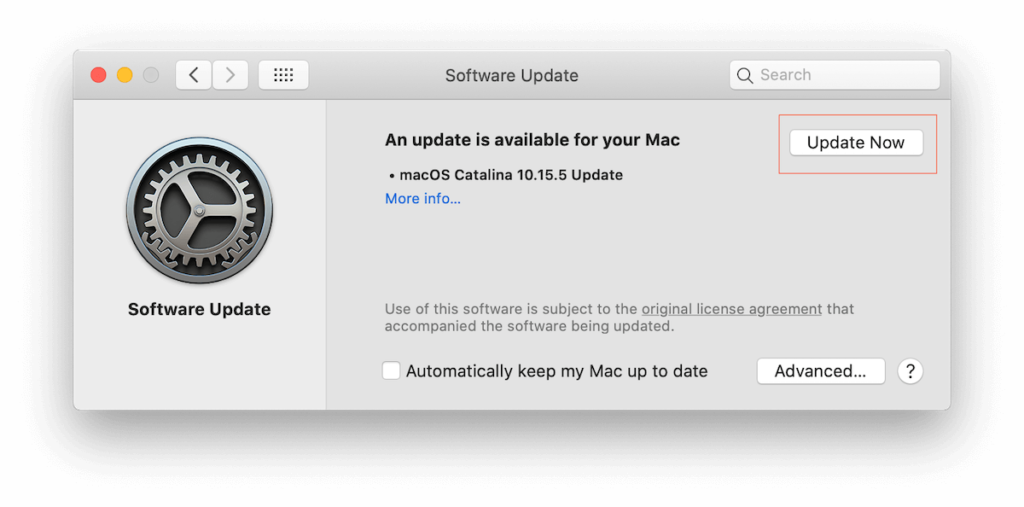
- Click on “Software Update.”
- Check the box next to “Automatically keep my Mac up to date.”
For Manual Updates:
- Check for Updates:
- Click on the Apple menu in the top-left corner of your screen.
- Select “System Preferences.”
- Click on “Software Update.”
- Review Available Updates:
- The Software Update window will display available updates. It may take a moment to check for updates.
- Install Updates:
- If updates are available, click the “Update Now” button.
- If prompted, enter your administrator password.
- Wait for Installation:
- The updates will download and install. Your Mac may need to restart to complete the installation.
- Restart Your Mac (if necessary):
- If the updates require a restart, you’ll be notified. Save your work and click “Restart.”
For Major macOS Updates:
- Back Up Your Data:
- Before installing a major macOS update, it’s advisable to perform a full backup of your system using Time Machine or another backup method.
- Check Compatibility:
- Ensure that your applications and hardware are compatible with the new macOS version. Visit the official Apple website or check with the developers of third-party apps.
- Download and Install:
- Major updates are often available through the Mac App Store. You may receive a notification prompting you to upgrade. Alternatively, you can go to “System Preferences” > “Software Update” and click “Upgrade Now” when a major update is available.
- Follow On-Screen Instructions:
- The installer will guide you through the process. Follow the on-screen instructions to complete the installation.
- Restart Your Mac:
- After the major update is installed, your Mac may require a restart to apply the changes.
Additional Tips:
- It’s recommended to close all open applications before installing updates.
- If you experience any issues during or after the update, check the Apple Support website or visit Boulder Mac Repair.
Remember that keeping your macOS updated is important for security and performance. Regularly checking for updates and installing them in a timely manner will help ensure that your Mac is running the latest software with the latest security patches.
- Why should I look for a Mac refurbished by Apple Certified Mac Technicians?

- Why does Apple matter when buying a MagSafe 1 or 2 adapter?

- What is the iPhone Air?

- What does it mean when an external hard drive format is for Mac or for Windows?

- Designed by Apple in California. Loved in Colorado.

- How do I migrate my iTunes and App Store purchases to another Apple Account.

- Boulder Mac Repair is currently purchasing Apple Devices for resale.

- What’s new in iOS 26?
